The Complete Guide to Agency Client Management Software for Modern Agencies
Discover how agency client management software integrates essential operations for enhanced efficiency. Learn key features and comparisons.
By WREMF Team · 2026-09-15
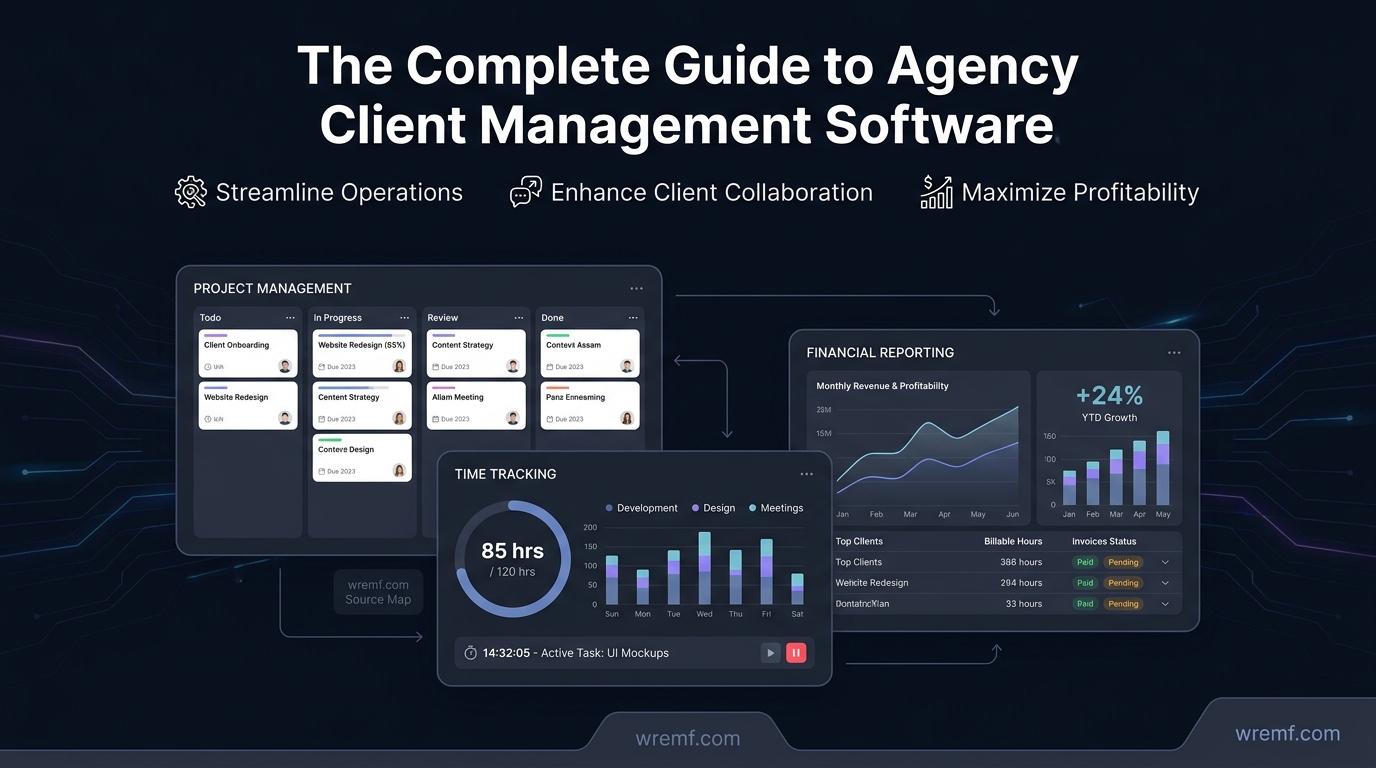
Agency client management software integrates crucial functions like project management, resource planning, and financial oversight into one platform. This software serves as an operational backbone for managing clients, tracking billable hours, invoicing, and ensuring project delivery aligns with client expectations. Agencies need tools adaptable to their size, service type, and billing model, with capabilities in CRM, client portals, and full operation suites. Brands like Scoro, Kantata, and Accelo offer various features that differ significantly from generic project management tools by including financial forecasting and workflow automation.
Key takeaways
- Agency management software combines crucial functions for seamless client, project, and resource management.
- Selecting the right software hinges on agency size, billing model, and service type support.
- Essential features include client portals, workflow automation, and financial reporting.
- Piloting software with a real client can validate its fit with existing workflows.
- Profitability metrics should drive evaluation of agency management software efficiency.
The Complete Guide to Agency Client Management Software for Modern Agencies
Agency client management software is the operational backbone that helps agencies manage clients, projects, resources, budgets, and reporting from a single platform. As agencies grow, coordinating client communication, tracking billable time, managing invoices, and delivering consistent project work across multiple accounts becomes genuinely difficult without the right system. This guide is for agency owners, operations managers, project leads, and marketing teams evaluating their options. It covers the core features every agency needs, how leading tools compare across project management, resource planning, financial management, and client collaboration, and how to choose the right software model for your agency's size and workflow. Whether you run a boutique creative agency or a multi-client growth team, the decisions you make about your agency management system have a direct effect on profitability and client retention.
QUICK ANSWER:
Agency client management software helps agencies manage clients, projects, workflows, time tracking, invoicing, and reporting in one system. The best option depends on whether your agency needs a CRM for pipeline management, a client portal for delivery, or an all-in-one agency management platform covering resources, budgets, profitability, and automation. Tools like Scoro, Teamwork.com, Kantata, and Accelo are built specifically for agency operations.
KEY TAKEAWAYS:
- Agency client management software combines project management, resource planning, time tracking, invoicing, and client reporting into one operational system.
- The best agency management software depends on agency size, service type, billing model, and whether the team needs a CRM, a delivery platform, or a full operations suite.
- Key features to evaluate include client portals, workflow automation, billable time tracking, retainer management, capacity planning, and financial reporting.
- Tools like Scoro, Kantata, Accelo, Teamwork.com, and Workamajig are purpose-built for agencies, while tools like Wrike, ClickUp, and Trello serve broader markets.
- Agencies should pilot their chosen software with a real client for two to four weeks before full rollout to validate fit with existing workflows.
- Profitability, not just productivity, should be the primary metric used to evaluate whether agency management software is working.
What Agency Client Management Software Actually Does
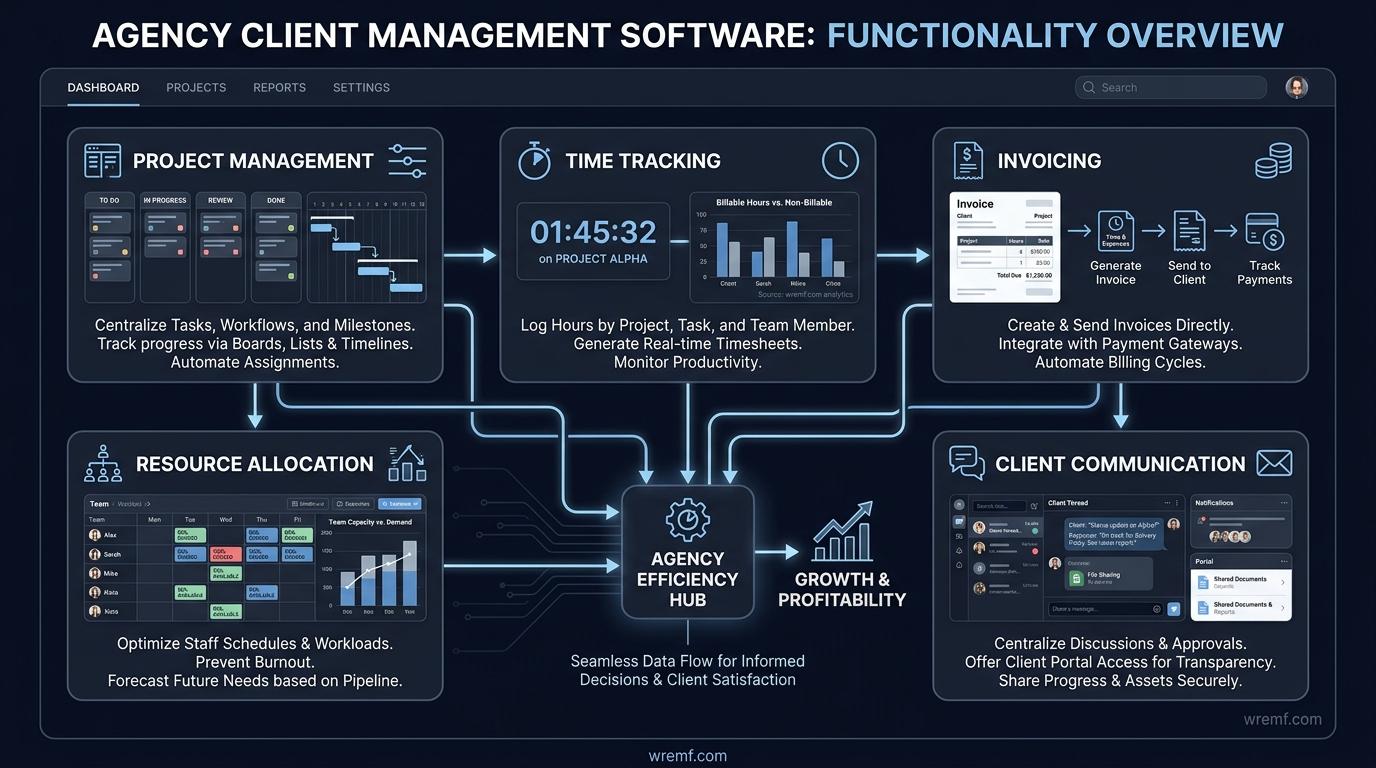
Agency client management software consolidates the operational functions that agencies need to deliver client work profitably, including project management, task management, time tracking, invoicing, resource allocation, and client communication. Without a unified system, agencies typically run on a combination of spreadsheets, email threads, disconnected project management tools, and separate billing software, which creates reporting gaps and profitability blind spots.
The core purpose of agency client management software is to connect what a client expects with what the agency can deliver, within budget and on schedule. When a software platform integrates project tracking, billable time, and financial reporting in one dashboard, agency leaders can see in real time whether a project is profitable, whether a team member is over capacity, and whether a client is at risk of churning.
Agency management software differs from generic project management software in one important way. Generic tools like Trello or basic task management software help teams organize work, but they do not account for the financial layer that agencies need. Purpose-built platforms for agencies include features such as retainer management, labor cost rates, financial forecasting, and client-facing service delivery workflows that generic tools rarely provide out of the box.
The category includes several types of software. CRM platforms focus on client relationships, sales pipelines, lead nurturing, and customer communication. Project management tools focus on task management, Gantt charts, deadlines, and workflow management. All-in-one agency management systems, such as Scoro, Kantata, and Accelo, combine both layers along with resource management, financial oversight, and analytics dashboards into a single agency management system.
Agencies that operate on retainers, time-and-materials billing, or fixed-fee projects each have different requirements. A retainer-based agency needs strong retainer management and recurring invoicing. A time-and-materials agency needs precise time tracking tools and automatic billing rules. A fixed-fee agency needs budget tracking, financial forecasting, and profitability reporting at the project level.
KEY TAKEAWAY: Agency client management software earns its value by connecting client expectations, project delivery, team capacity, and financial outcomes in one system, something generic project management tools cannot reliably do.
The Core Features Every Agency Needs
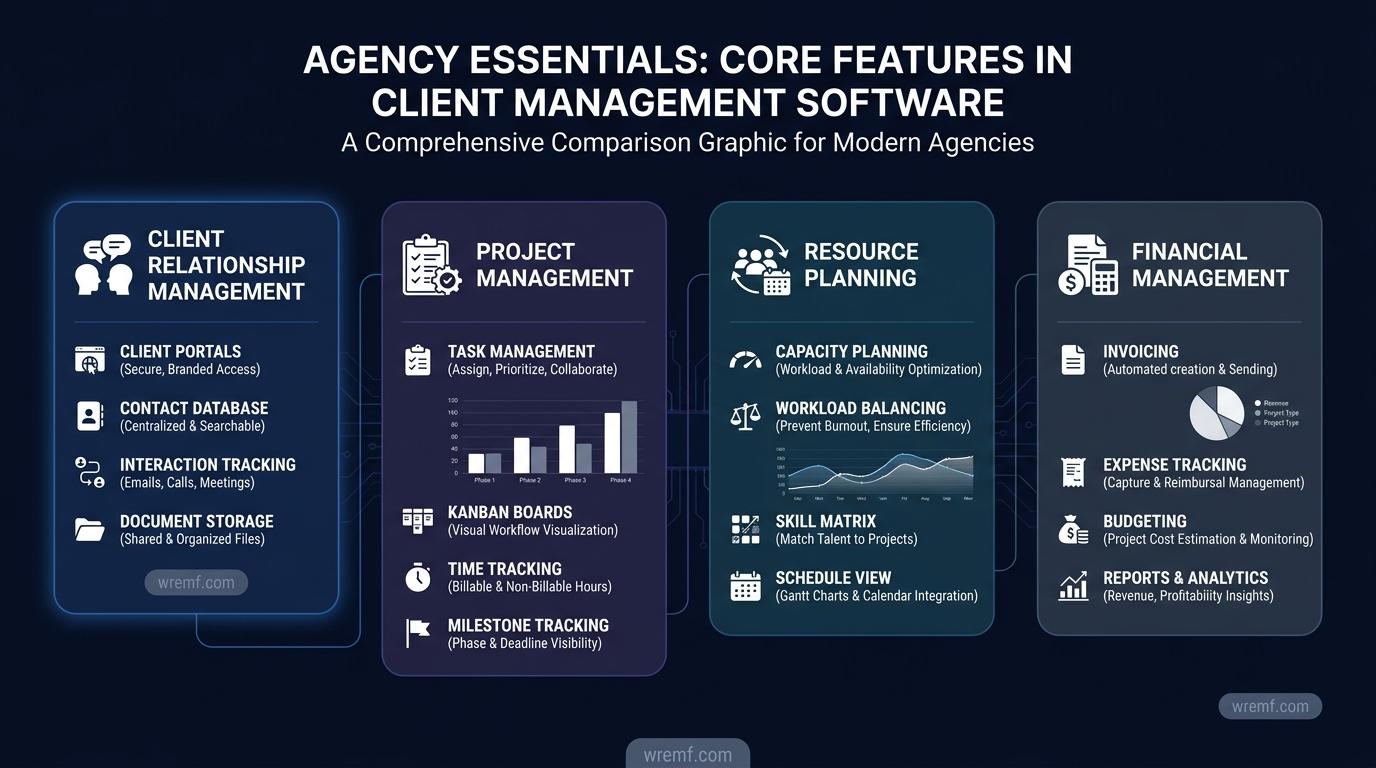
The best agency client management software covers four operational layers: client relationship and communication, project and task management, resource and capacity planning, and financial management. Gaps in any one layer create friction that compounds as the agency scales.
Client Relationship and Communication
Client portals give clients secure access to project progress, feedback, files, and reports without requiring internal tool access. Strong client portals reduce the volume of email, prevent version confusion, and create a professional client experience. Platforms like ManyRequests and SuiteDash are built primarily around the client portal model, while tools like Teamwork.com and Scoro include client portals as part of a broader agency management suite.
Client communication tools within agency software should support two-way messaging, feedback systems, and approval workflows. Some teams integrate communication tools like Slack directly with their project management platform to keep conversations linked to specific tasks or projects. Client onboarding workflows, which automate the process of collecting briefs, contracts, and access credentials from new clients, reduce the administrative burden on account managers and improve the client experience from day one.
Project and Task Management
Project management is the operational core of any agency management platform. Agencies need task management that supports due dates, subtasks, dependencies, and project milestones. Workflow management features like Kanban-style boards, Gantt charts, and visual workflow views give project managers visibility across multiple client accounts simultaneously.
Wrike offers advanced workflow automation, client intake forms, external client approvals, and portfolio-level reporting across projects. ClickUp provides multiple project views including list, board, calendar, and timeline views alongside automation rules and workload management. Trello uses a simple Kanban-style board model that suits smaller agencies or individual freelancers managing straightforward projects. Teamwork.com is specifically designed for agency client work, combining task management with billable time tracking, retainer management, and client portals in one platform.
Project tracking should include the ability to monitor project milestones, track deadlines, and flag projects that are running over budget or schedule before problems escalate. Templates for repeated project types, such as campaign launches or client onboarding flows, reduce setup time and standardize delivery quality.
Resource and Capacity Planning
Resource management is where many agencies lose profitability without realising it. When team members are assigned to more work than they can deliver, projects slip, quality drops, and client relationships suffer. Capacity planning gives agency leaders visibility into who is available, who is over-allocated, and how incoming work will affect existing commitments.
Resource planning tools should show each employee's scheduled hours against their available hours across a planning horizon. Resource allocation should be connected to project timelines so that changes in one area automatically reflect in the other. Platforms like Kantata and Scoro are recognized by Gartner as collaborative work management platforms that combine resource and capacity planning with financial management for professional services teams.
Financial Management and Invoicing
Financial management is often the weakest layer in agencies that rely on generic project management tools. Purpose-built agency management software should include budget tracking at the project level, billable time conversion, invoicing, retainer management, expense tracking, and financial reporting.
Invoicing features should allow agencies to generate invoices directly from tracked time and approved expenses, reducing manual work and billing errors. Integration with accounting tools like QuickBooks Online and FreshBooks is standard on most agency platforms. Profitability reporting should show margin at the client, project, and service level, so agency leaders can identify which accounts are healthy and which are eroding margin.
Payroll integration, labor cost rates, time estimates, and financial forecasting features help agencies plan ahead rather than react to profitability problems after the fact. Financial oversight across multiple clients requires analytics dashboards that aggregate data from projects, timesheets, and invoices in one view.
KEY TAKEAWAY: Agencies that evaluate software across all four layers, client communication, project management, resource planning, and financial management, are more likely to choose a platform that scales with their operations rather than one they outgrow within a year.
Leading Agency Client Management Software: A Practical Comparison
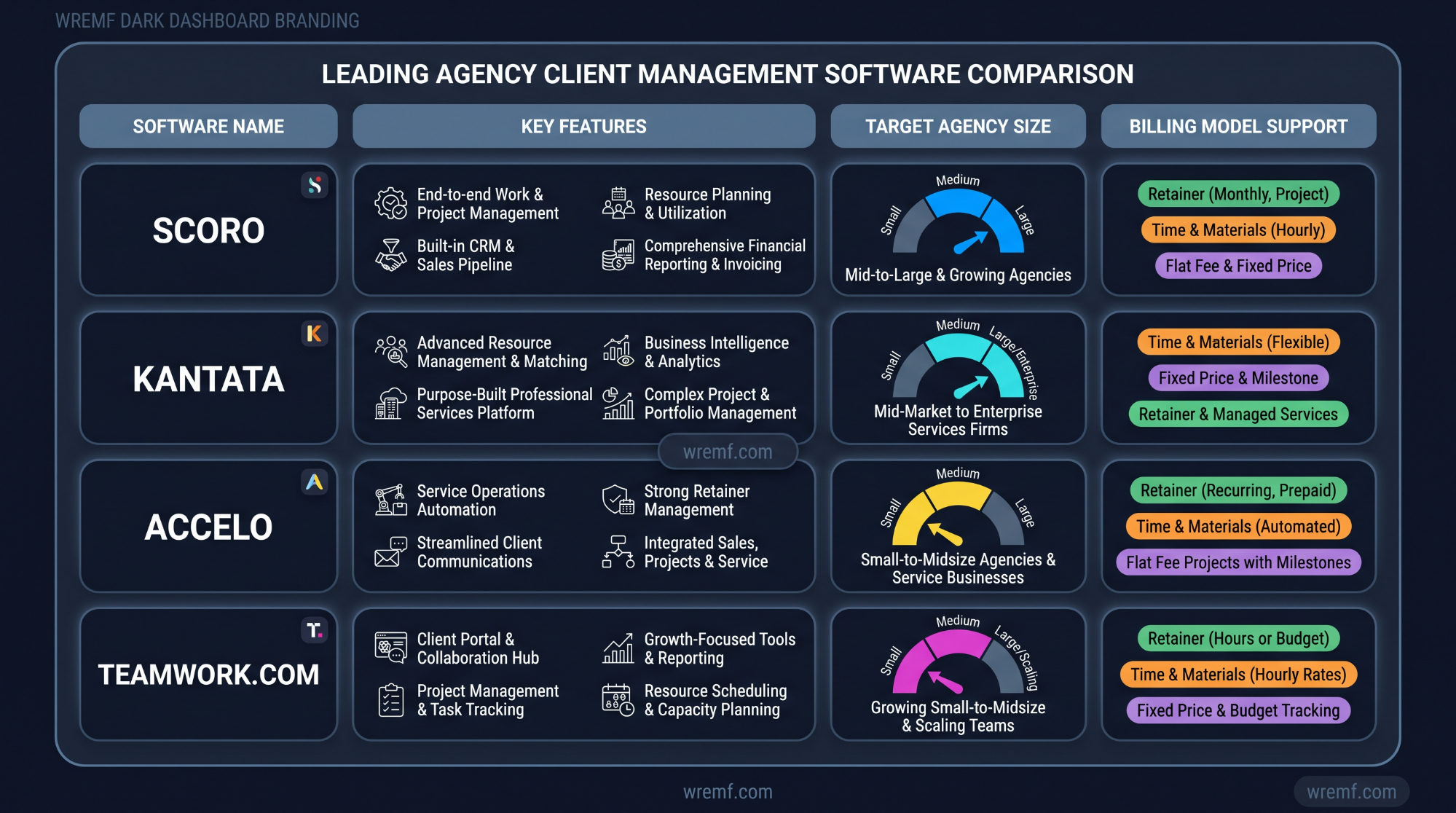
Choosing between agency software solutions depends on agency size, billing model, service type, and the operational problems the agency is trying to solve. The following comparison covers purpose-built agency platforms and widely used tools that agencies adapt for client management.
Primary purpose
- Scoro: End-to-end agency management including projects, resources, time tracking, invoicing, and reporting.
- Kantata: Resource and capacity planning combined with project management for professional services.
- Accelo: Client work management covering retainers, projects, tickets, and billing.
- Teamwork.com: Agency project delivery with client portals, time tracking, and retainer management.
- Workamajig: Financial management and project management for creative agencies.
- ManyRequests: Client portal and request management for productized service agencies.
- SuiteDash: All-in-one platform with CRM, client portals, project management, and invoicing for SMBs.
- Wrike: Workflow automation, project management, and collaborative work management for broader teams.
- ClickUp: Flexible task management and project management platform suitable for agencies of various sizes.
Billing model support
- Scoro: Retainers, fixed fee, time and materials.
- Kantata: Time and materials, fixed fee, professional services billing.
- Accelo: Retainers, tickets, milestones, project billing.
- Teamwork.com: Retainer management, time-based billing, fixed fee.
- Workamajig: Advertising and creative agency billing with job costing.
- ManyRequests: Subscription and productized service billing.
- SuiteDash: Flexible billing with invoicing and subscription options.
Resource and capacity planning
- Scoro: Built-in resource and capacity planning with workload views.
- Kantata: Advanced resource management software with forecasting.
- Accelo: Resource allocation through scheduling and workload management.
- Teamwork.com: Workload management and capacity views.
- Wrike: Portfolio and workload views across projects.
- ClickUp: Workload view available on higher plans.
Financial reporting and profitability
- Scoro: Project-level profitability, financial forecasting, invoicing.
- Kantata: Financial reporting and margin analysis.
- Accelo: Financial oversight across projects, retainers, and tickets.
- Workamajig: Deep financial management including payroll, job costing, and financial reporting.
- Teamwork.com: Budget tracking, profitability reporting, billable time.
Client portal availability
- Teamwork.com: Built-in client portal.
- ManyRequests: Core client portal feature.
- SuiteDash: Full client portal with CRM and onboarding.
- Scoro: Client center for project visibility.
- Wrike: External collaboration with guest access and approval workflows.
Integration breadth
- Zapier: Connects most agency tools that lack native integrations, supporting automated workflows across platforms.
- Wrike: Adobe Creative Cloud, Slack, Google Drive, and Microsoft Teams integrations.
- Monday.com: Adobe Creative Cloud, Slack, Google Drive, and Trello integrations.
- ClickUp: Multi-channel integrations and API tools for custom connections.
- Scoro: API tools and broad integration support.
Agencies evaluating tools should prioritise the software model that closes their biggest operational gap first. An agency with strong project delivery but poor financial visibility should prioritise platforms with financial reporting and invoicing. An agency with strong financial management but poor client communication should prioritise client portals and feedback systems.
Tour the product and try Scoro for free for 14 days, no credit card required, which makes it a practical starting point for agencies evaluating all-in-one options. Teamwork.com offers tiered plans starting from free, with the Deliver plan adding time tracking and resource management from a low per-user monthly cost. Those looking for an overview of how agency management tools compare with one another can review the comparative analysis published in Gartner's AI research on collaborative work management platforms and professional services software categories.
KEY TAKEAWAY: No single agency client management software is best for every agency. The right choice depends on billing model, team size, client volume, and whether the agency's biggest gap is in delivery, finance, resource planning, or client communication.
Workflow Automation and Agency Operations
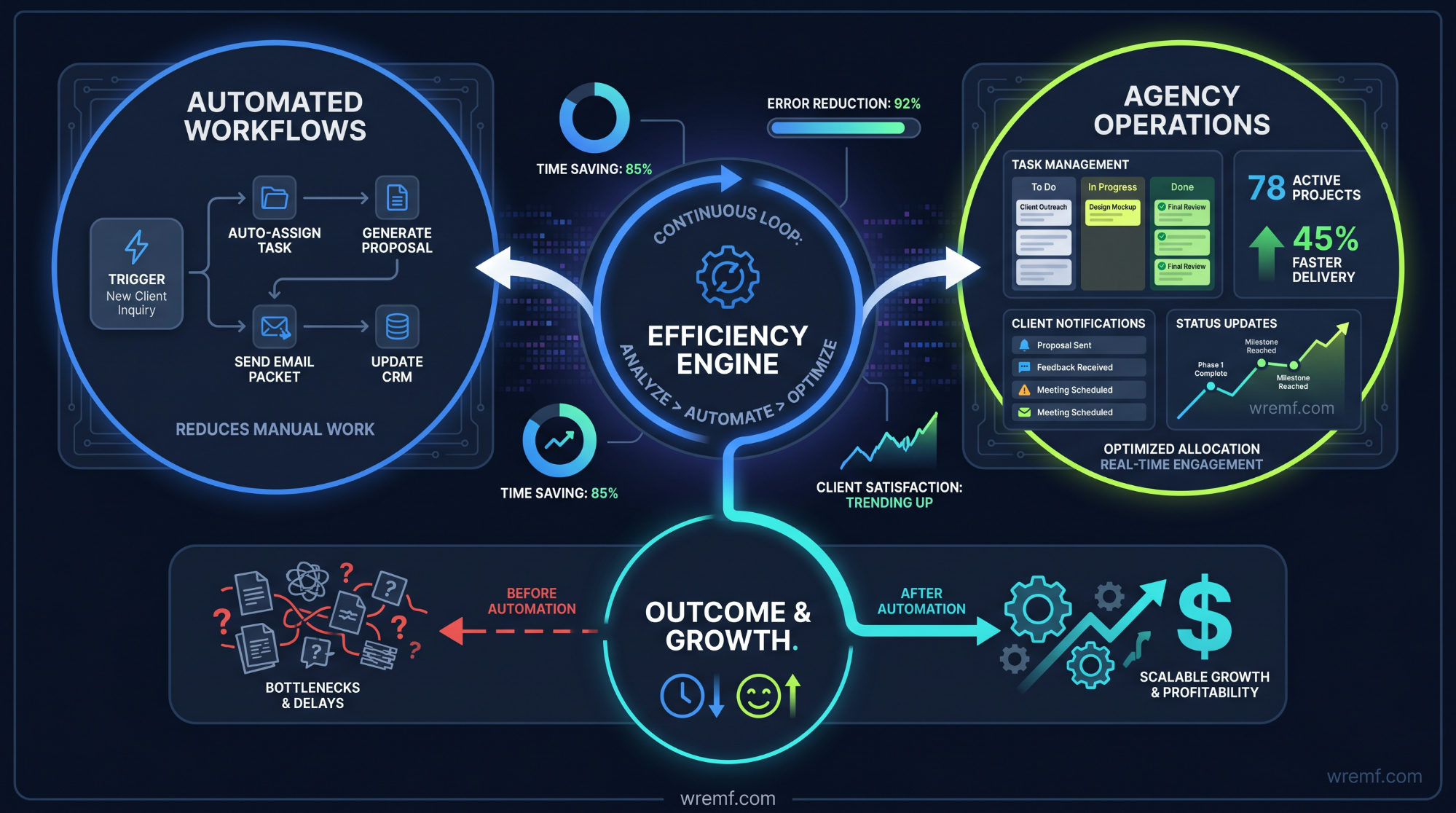
Workflow automation reduces the manual administrative work that consumes agency time without generating billable output. Automated workflows handle recurring tasks, status updates, approval routing, invoice generation, and client notifications, freeing project managers and account managers to focus on higher-value work.
Automation in agency management software typically works through rule-based triggers. When a task moves to a certain status, an automated notification is sent to the client. When a project reaches a milestone, the billing workflow is triggered. When a resource is over-allocated, the platform flags the conflict for the team lead. These automations accumulate significant time savings across a large client base.
Zapier extends automation beyond individual platforms by connecting apps that do not have native integrations. An agency might use Zapier to connect their CRM with their project management tool, automatically creating a project when a deal closes in the sales pipeline. Integrations like Calendly for scheduling, Mailchimp for email marketing, and Slack for team communication can all be linked through Zapier or native integrations to create seamless handoffs between tools.
According to reporting from VentureBeat's AI coverage artificial intelligence is increasingly being incorporated into agency management software to assist with resource forecasting, automated project summaries, and intelligent task prioritisation. Platforms like Accelo and Wrike have begun integrating AI-assisted features to reduce repetitive decision-making for project managers.
Monday.com has reported automating over 40,000 tasks monthly for its agency users through its automation engine, which handles notifications, status updates, and task assignments without manual intervention. This scale of automation has a meaningful effect on productivity across teams managing large client volumes.
Workflow management within creative agencies requires specific automations that generic tools overlook. Creative collaboration tools need to support brief intake, asset review, version control, approval routing, and final delivery confirmation. Adobe Creative Cloud integration allows designers to work within their native tools while project status updates and feedback flow back into the agency management platform automatically.
Traffic management software is a subset of agency operations software used specifically to manage the flow of work through a creative team, balancing incoming briefs against available resources and current workload. Tools like Kantata incorporate traffic management views alongside resource and capacity planning.
KEY TAKEAWAY: Workflow automation is not a luxury feature for large agencies. It is a core operational requirement for any agency managing multiple clients, recurring deliverables, and approval-dependent creative processes.
Resource Planning and Capacity Management in Practice
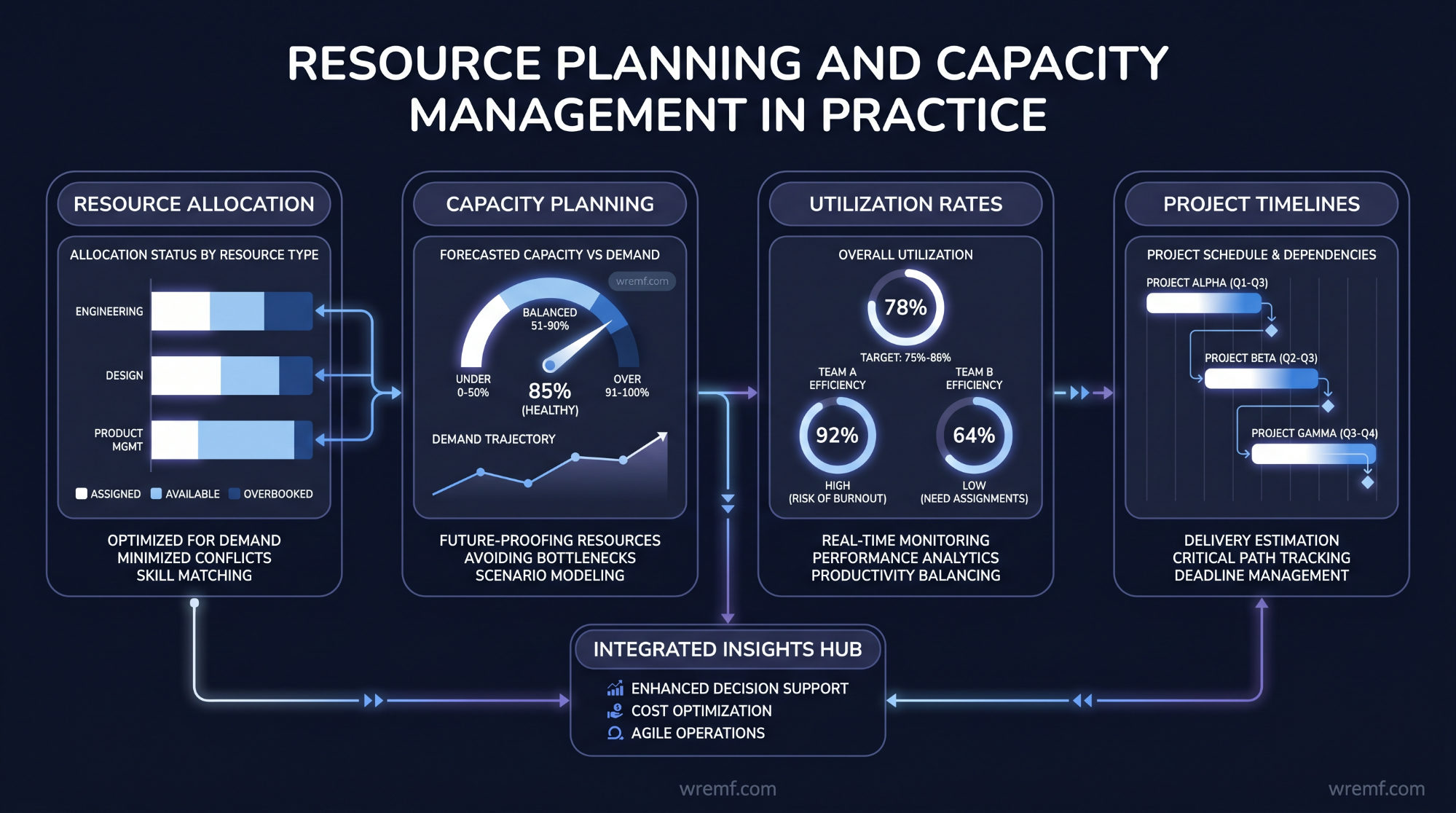
Resource management is one of the highest-leverage functions in agency client management software because it directly affects both delivery quality and profitability. Agencies that cannot see team capacity in real time tend to over-promise on timelines, under-price new work, and burn out high-performing employees.
Resource and capacity planning begins with visibility. A resource management software platform should show each employee's booked hours, available hours, and forecasted utilisation across a planning window, typically two to eight weeks ahead. When a new client project is scoped, the project manager should be able to check available capacity before committing to a start date.
Resource allocation should be connected to project milestones and task dependencies. If a task is delayed, the resource model should automatically shift downstream allocations to reflect the new timeline. Kantata is specifically recognised for its resource management capabilities within professional services, offering detailed resource and capacity planning views that connect individual utilisation to project profitability.
Capacity planning also informs hiring decisions. When an agency consistently sees team members operating above eighty percent utilisation across three or more months, that is a signal that additional headcount or contractor capacity is needed. Resource management software makes this argument visible with data rather than anecdote.
Labor cost rates embedded in the resource management system allow agency leaders to see the cost of resource allocation against the revenue generated by each project. This connection between time, cost, and revenue is what makes resource management software essential to financial oversight rather than just operational planning.
Agencies managing multiple client accounts simultaneously need workload views that show resource distribution across all active projects, not just individual project timelines. Portfolio-level resource views in platforms like Wrike and ClickUp allow project managers to rebalance workloads when one client demands more time than originally scoped.
KEY TAKEAWAY: Resource and capacity planning software transforms staffing decisions from reactive guesswork into data-driven management, which directly protects agency profitability and delivery quality.
Financial Management, Invoicing, and Profitability Tracking
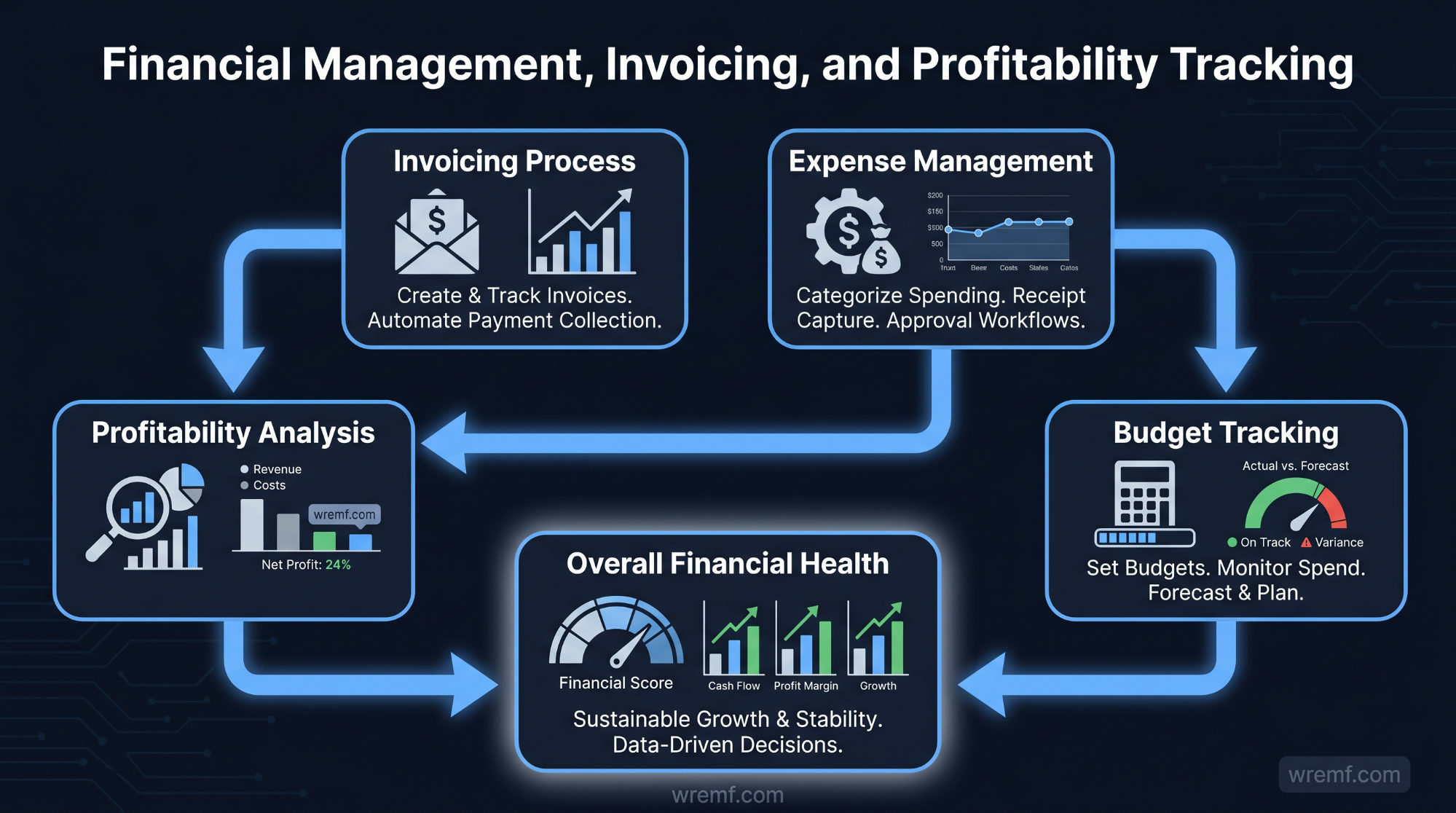
Financial management is the area where agencies most commonly experience hidden losses. Time that is not tracked is time that cannot be billed. Projects that run over scope without budget alerts erode margin silently. Invoices that are delayed or inaccurate damage client trust and cash flow.
Agency client management software with integrated financial management closes these gaps by connecting time tracking to billing, budgets to project plans, and invoices to client accounts. Billable time tracking is the foundation. Every hour spent on client work should be logged against a specific project and task, with the billing rate applied automatically based on the employee role or client contract.
Retainer management is a specific financial requirement for agencies on monthly retainer agreements. The software should track how many hours are included in the retainer, how many have been used, and whether rollover hours apply. Alerts when retainer hours are nearly exhausted allow account managers to have commercial conversations with clients before surprises appear on the invoice.
Invoicing features should generate invoices directly from approved timesheets and expenses, reducing manual data entry and billing errors. Integration with QuickBooks Online or FreshBooks allows invoices to flow into the agency's accounting system automatically. FreshBooks is particularly well suited to smaller agencies and SMBs that need straightforward invoicing without the complexity of enterprise accounting software.
Financial reporting at the project level should show budgeted hours versus actual hours, budgeted cost versus actual cost, and projected margin against delivered margin. Profitability reporting at the client level shows which relationships are commercially healthy and which are consuming more resource than the revenue justifies. Financial forecasting, which projects future revenue based on confirmed retainers and pipeline work, helps agency principals make hiring and investment decisions with confidence.
Expenses tracked within the agency management system, including software subscriptions, contractor costs, travel, and production expenses, should feed directly into project budgets and client invoices to ensure full cost recovery. Payroll data, where integrated, allows the system to calculate true project profitability by including all labor costs, not just billable time.
According to HBR's AI and machine learning coverage professional services firms that build strong financial visibility into their project delivery systems consistently outperform those that rely on end-of-month financial reconciliation. For agencies, this means embedding financial tracking into the daily workflow rather than treating it as a separate reporting exercise.
KEY TAKEAWAY: Agencies that connect time tracking, budgets, retainer management, and invoicing in one system recover more billable time, generate more accurate invoices, and make better commercial decisions than agencies that manage finance separately from project delivery.
Client Portals, Client Reporting, and Client Communication
Client portals are one of the most commercially important features in agency client management software because they directly affect client retention and perceived value. A well-designed client portal gives clients a single place to review project progress, access files, submit feedback, approve deliverables, and view reports, without requiring the client to have access to the agency's internal project management tools.
ManyRequests is purpose-built around the client portal model, making it a strong choice for productized service agencies that manage client requests at volume. SuiteDash combines CRM, client portals, invoicing, and project management into one platform aimed at SMBs and smaller agencies. Teamwork.com includes a built-in client portal that connects directly to project timelines, task lists, and time tracking, giving clients visibility into delivery without exposing internal-only data.
Client reporting is a distinct requirement from internal reporting. Clients want to see progress against agreed deliverables, budget consumption, and key performance indicators, not raw project data. Agency management software should support customisable client reports that can be scheduled, branded, and delivered automatically without manual export and formatting each month.
Client communication within the software should support threaded discussions tied to specific projects or tasks. This prevents conversations from being lost in email threads and ensures that feedback from clients is captured in context. Feedback systems that allow clients to annotate files, approve deliverables, or flag revisions directly within the platform reduce the back-and-forth that consumes account manager time.
Client onboarding automation is the first impression a new client has of the agency's operational maturity. Software that automates the collection of onboarding information, contract signatures, access credentials, and initial brief data signals professionalism and reduces the time between contract signature and project kick-off.
Client relationships are built on consistency, communication, and demonstrated progress. Analytics dashboards visible to clients that show live metrics against agreed goals, whether those are SEO performance, campaign delivery, or content output, reinforce the agency's value between formal review meetings. This is particularly relevant for agencies that manage ongoing performance work where results compound over time.
For agencies that also manage their own AI search visibility and want to understand how AI engines like ChatGPT, Gemini, and Perplexity are citing their brand, tools like WREMF provide a separate layer of AI brand monitoring that sits alongside agency management software to track source citations, AI share of voice, and prompt-level performance across AI engines.
KEY TAKEAWAY: Client portals, structured client reporting, and integrated feedback systems are the features that most directly influence client retention because they make the agency's work visible, organised, and easy to review.
How to Choose Between Agency Management Software Models
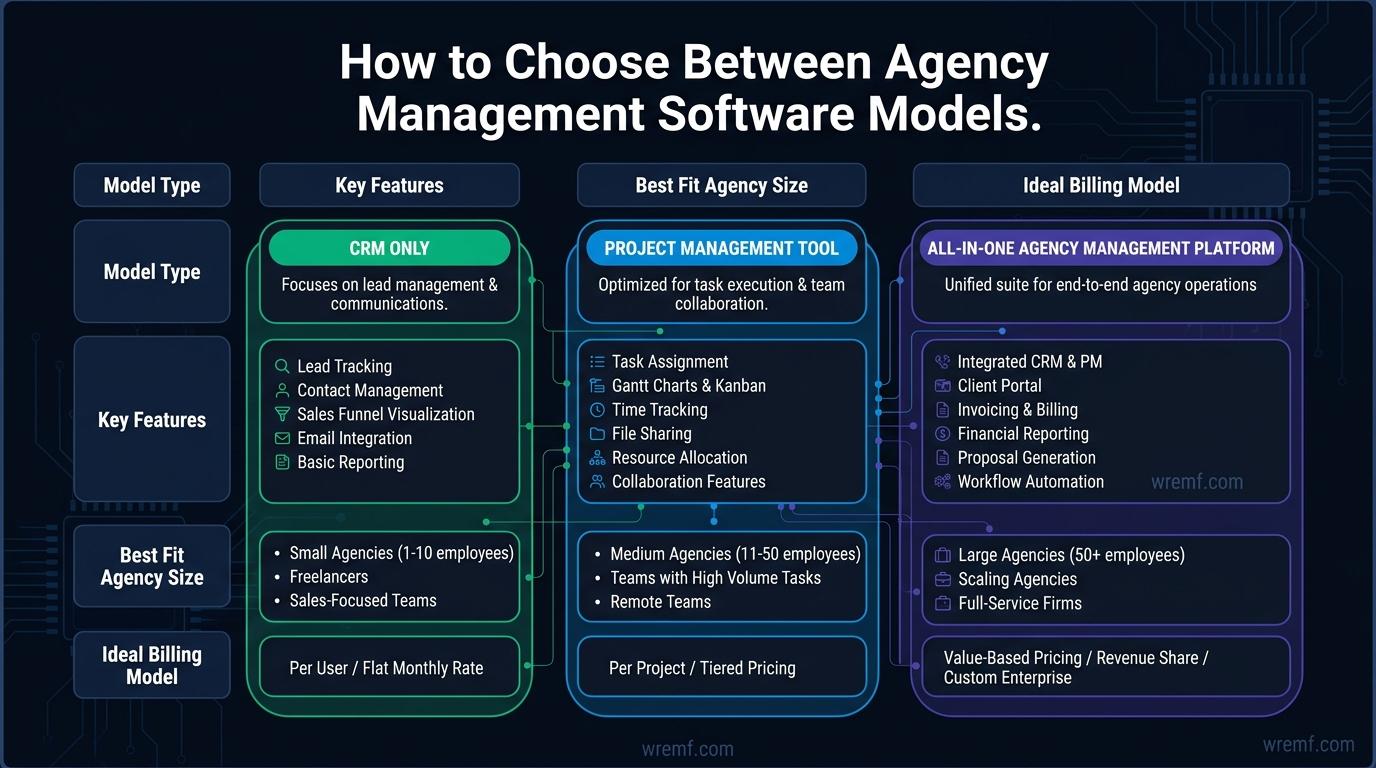
The choice between a purpose-built all-in-one agency management platform, a CRM combined with project management tools, or a modular stack of specialist tools depends on the agency's size, complexity, billing model, and internal operations maturity.
The following comparison helps agencies identify which software model fits their current situation.
Primary operational gap
- CRM only: Client relationship management, pipeline tracking, lead nurturing, sales automation.
- Project management tool only: Task management, workflow organisation, deadline tracking.
- All-in-one agency management platform: Full operational coverage including projects, resources, finance, clients, and reporting.
Best fit by agency type
- CRM focus: Agencies with a large sales pipeline, high lead volume, and CRM-driven growth. HubSpot is the most common choice.
- Project management focus: Agencies with strong delivery discipline that need better task organisation. Wrike, ClickUp, or Trello fit here depending on complexity.
- All-in-one focus: Agencies that need resource management, financial reporting, retainer billing, and client portals in one system. Scoro, Kantata, Accelo, and Teamwork.com lead this category.
Best fit by team size
- Solo consultants and small agencies under ten people: ManyRequests, SuiteDash, or Teamwork.com Starter.
- Growing agencies between ten and fifty people: Teamwork.com, Scoro, Accelo, or ClickUp with financial integrations.
- Large agencies and multi-market teams: Kantata, Scoro, Workamajig, or Accelo with full API integrations.
Best fit by billing model
- Retainer-heavy: Teamwork.com, Accelo, Scoro.
- Time and materials: Kantata, Accelo, FreshBooks integration.
- Fixed fee with creative production: Workamajig, Scoro.
- Productized services: ManyRequests.
Integration needs
- Slack: Most major platforms support Slack integration.
- Google Drive: Supported natively by Monday.com, Wrike, ClickUp, and Teamwork.com.
- Adobe Creative Cloud: Wrike and Monday.com offer direct Adobe Creative Cloud integrations.
- QuickBooks Online: Standard integration across Scoro, Teamwork.com, Accelo, and Workamajig.
- Zapier: Available as an integration layer for tools that lack direct connections.
The recommendation for most growing agencies is to start with an all-in-one agency management system that covers the core operational layers, even if some features are not used immediately. Starting with a fragmented stack and consolidating later is significantly more disruptive than starting consolidated and expanding. A focused agency can pilot agency management software in two to four weeks, then scale adoption in waves across the team.
Agencies exploring how AI-driven content and search visibility fits into their marketing operations can review the AI search engine optimization guide to understand how AI discovery is changing the way clients find and evaluate agencies.
KEY TAKEAWAY: Most agencies benefit from starting with an all-in-one platform rather than assembling a modular stack, because integration complexity, reporting gaps, and data silos become more expensive to fix as the agency grows.
Reporting, Analytics, and Performance Dashboards
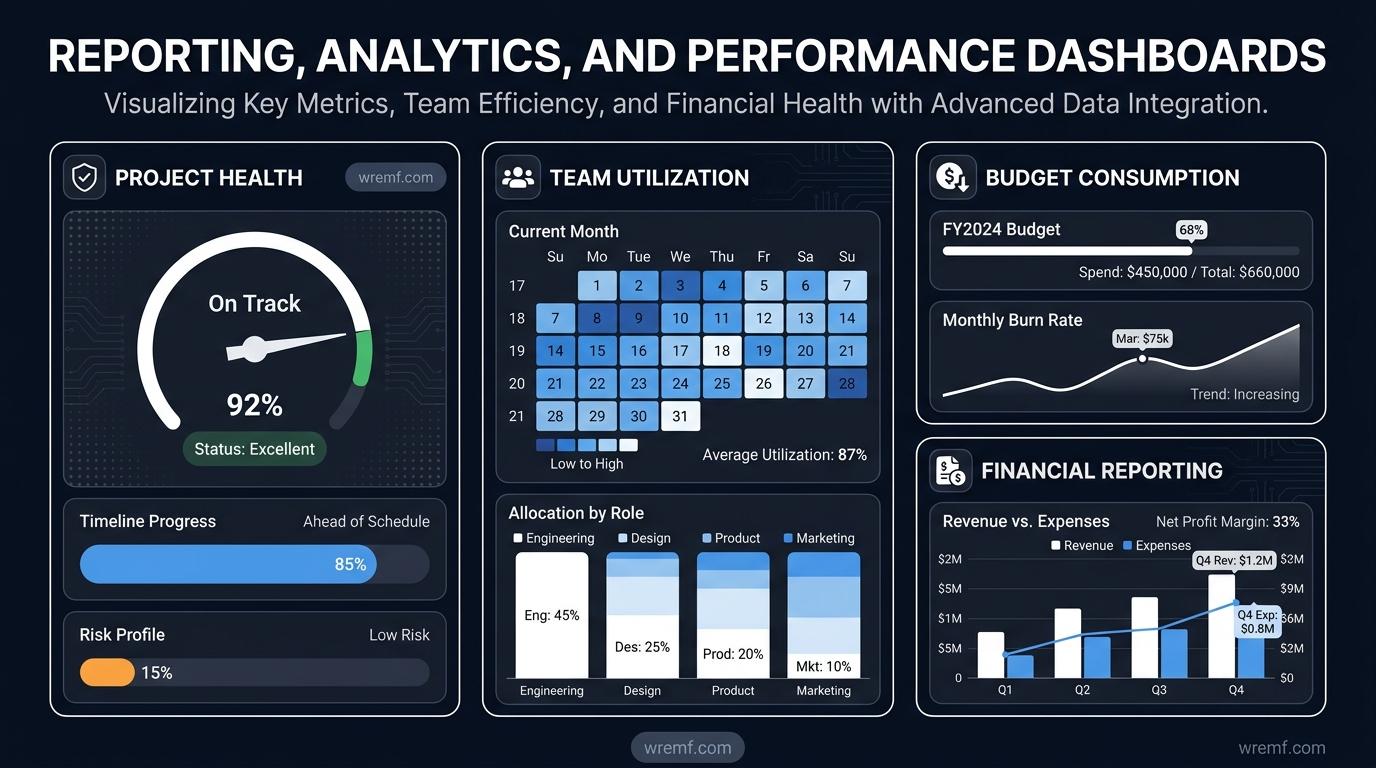
Reporting in agency client management software serves two distinct audiences: the internal agency team and the external client. Each needs different data, different formats, and different frequency. Software that conflates these two reporting needs forces agencies to manually adapt internal data into client-facing formats, which wastes time and introduces errors.
Internal reporting dashboards should give agency leaders a real-time view of project health, team utilisation, budget consumption, outstanding invoices, and pipeline revenue. Key metrics include billable time as a percentage of total time, project profitability margin, retainer utilisation, and client retention rate. These metrics tell the agency whether it is operating efficiently and growing sustainably.
Analytics dashboards that aggregate data across all client projects help operations leads identify patterns. Which clients consistently run over budget? Which project types generate the best margin? Which team members are consistently under-utilised? These insights inform pricing decisions, service line development, and hiring plans.
Time tracking tools generate the raw data that powers most financial and operational reporting. Accurate time tracking is a prerequisite for accurate invoicing, profitability reporting, and resource planning. Agencies that use time tracking software with automated reminders and mobile entry see higher compliance rates than those that rely on end-of-week manual entry.
Client-facing reporting should be brandable, scheduled, and automated where possible. Reporting and analytics software that connects to client data sources, including SEO platforms, PPC dashboards, social media analytics, and email marketing performance, allows agencies to deliver consolidated client reports without manually compiling data from multiple tools.
AgencyAnalytics is a reporting tool that specialises in client reporting for marketing agencies, offering over eighty native integrations across SEO, PPC, social, email analytics, and call tracking, with automated report scheduling and white-label delivery. This type of specialist reporting tool complements rather than replaces an agency management platform.
Performance reporting should extend beyond project delivery metrics to include the commercial outcomes the client hired the agency to achieve. CTR metrics, conversion rates, and other performance indicators should appear alongside delivery status in client reports, reinforcing the agency's accountability for results.
For agencies managing clients who want to understand their AI search presence, advanced analytics capabilities like those offered by WREMF enable prompt-level reporting and AI share of voice tracking across engines like ChatGPT, Gemini, and Perplexity. Teams interested in this layer of visibility can explore the AI mention tracking guide to understand how AI citation data connects to client reporting.
KEY TAKEAWAY: Agencies that separate internal operational reporting from client-facing performance reporting, and automate both where possible, reduce administrative overhead significantly while delivering a more professional client experience.
A Practical Workflow for Implementing Agency Client Management Software
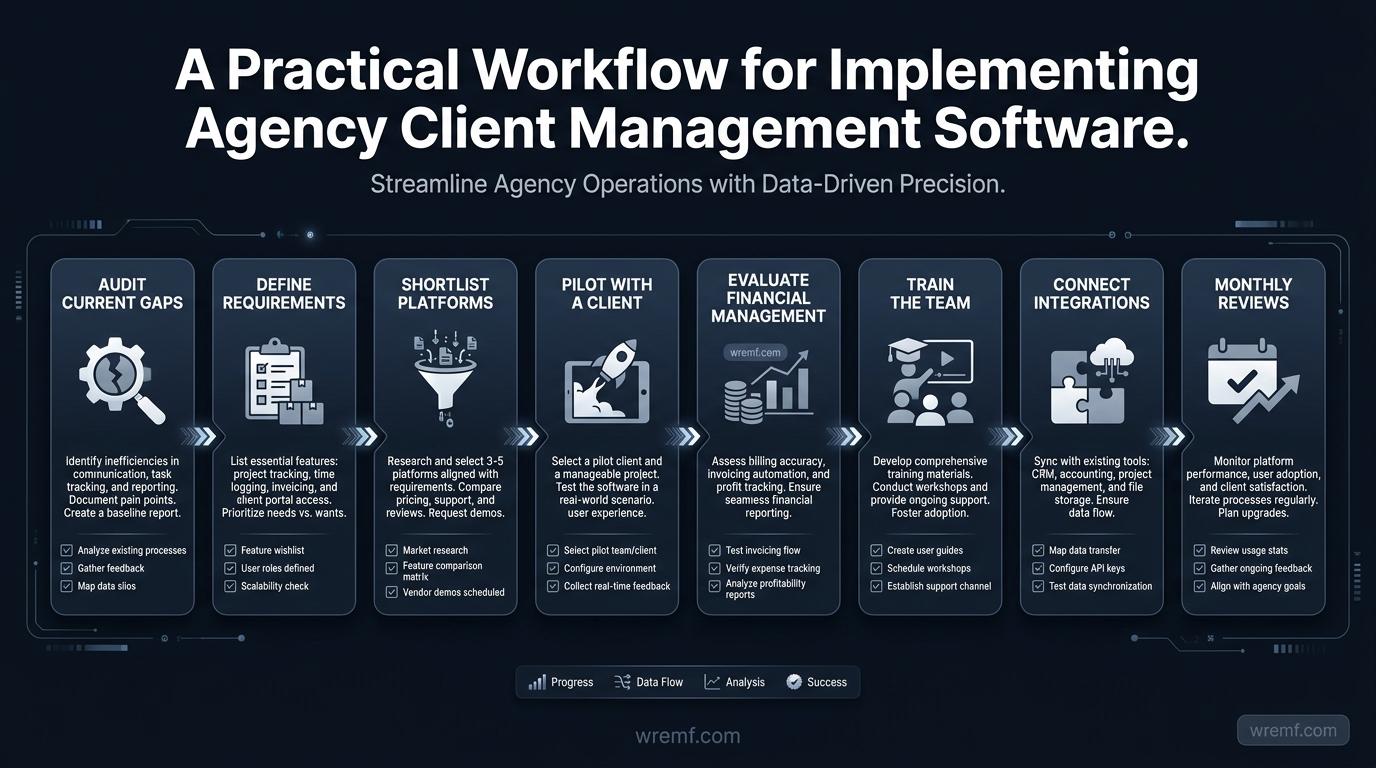
Implementing agency client management software is a change management exercise as much as a technical one. Choosing the right platform is only the first step. Getting the team to use it consistently and correctly determines whether the investment delivers value.
Step 1: Audit your current operational gaps.
Before evaluating tools, identify where your agency loses time, money, or client confidence. Common gaps include untracked billable time, invoice disputes, missed deadlines, poor client communication, and invisible capacity constraints.
Step 2: Define your non-negotiable requirements.
List the features your agency cannot operate without. For most agencies this includes time tracking, project tracking, client reporting, and invoicing. Secondary requirements might include client portals, retainer management, or resource and capacity planning.
Step 3: Shortlist platforms that match your billing model and team size.
Use the billing model and team size criteria above to create a shortlist of three to five platforms. Avoid evaluating more than five tools simultaneously, as this creates decision fatigue rather than clarity.
Step 4: Pilot with a real client for two to four weeks.
Set up one active client account in your shortlisted platform and run the delivery workflow through the tool. Track time, manage tasks, log feedback, and generate a client report. This reveals usability issues, integration gaps, and missing features before full rollout.
Step 5: Evaluate the financial management layer specifically.
During the pilot, test invoicing, expense tracking, and profitability reporting. Financial management is where agencies most commonly discover that a tool falls short of their needs, and it is better to discover this during a pilot than after migrating the entire client base.
Step 6: Train the team and establish non-negotiable usage standards.
Define which activities must be tracked in the platform and by when. Time entries submitted within twenty-four hours, for example, are significantly more accurate than entries logged at the end of the week. Establish clear ownership for each area of the platform.
Step 7: Connect integrations and automate recurring workflows.
Once the team is using the platform consistently, layer in integrations with Slack, Google Drive, QuickBooks Online, or Zapier as appropriate. Build automated workflows for recurring tasks such as invoice generation, project status updates, and client report delivery.
Step 8: Review operational and financial metrics monthly for the first quarter.
In the first three months, review billable time recovery, project profitability, and invoice accuracy monthly. These metrics show whether the software is generating the operational improvements that justified the investment.
KEY TAKEAWAY: A phased implementation approach that starts with a real client pilot, validates the financial management layer, and establishes usage standards before full rollout gives agencies the highest probability of a successful transition.
Real-World Scenarios: How Different Agency Types Use Client Management Software
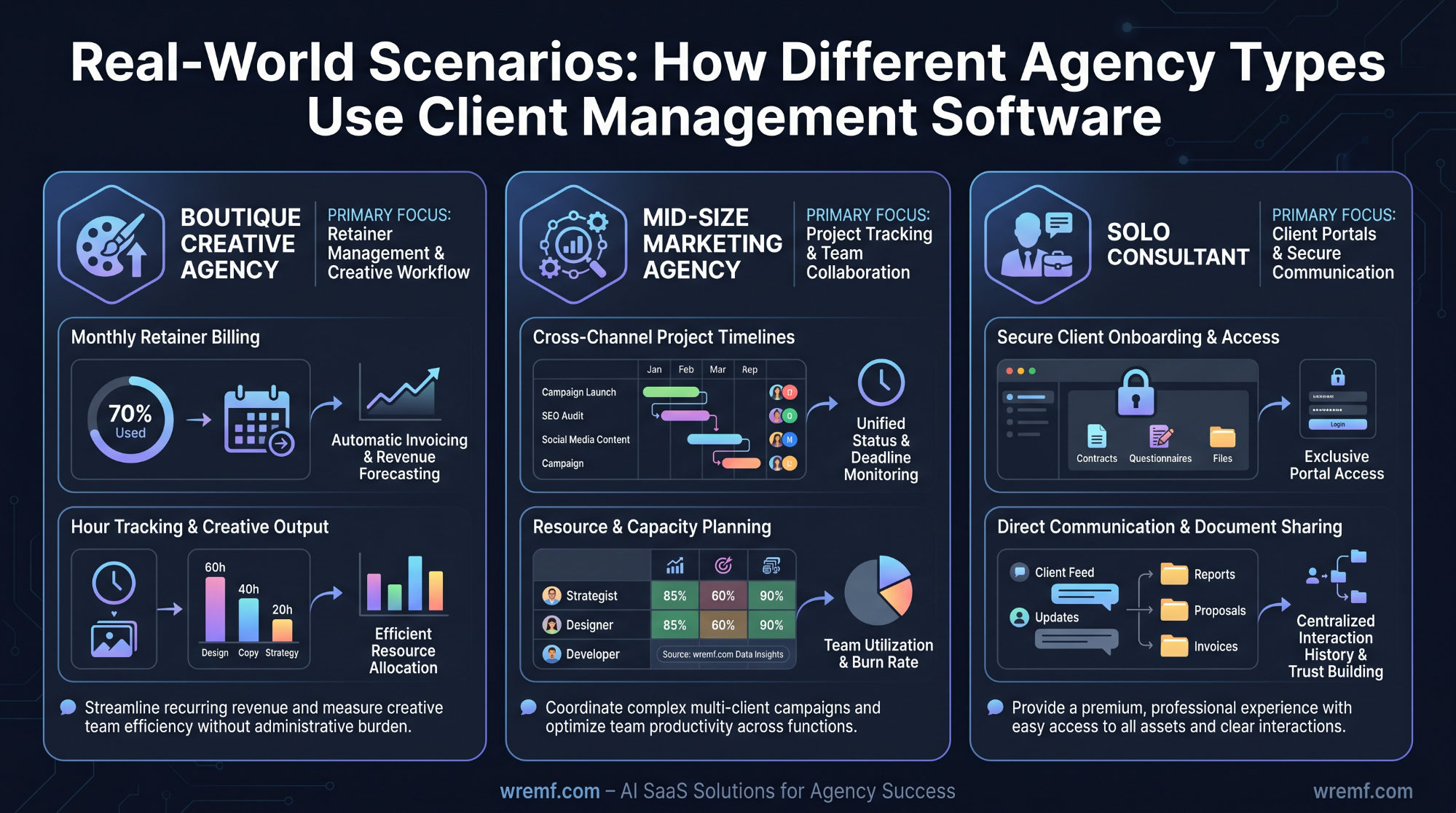
The right agency client management software looks different depending on the agency's service model, team size, and client base. These scenarios illustrate how different agency types apply the same software categories to different operational challenges.
Scenario One: A boutique creative agency with eight employees managing retainer clients.
A small creative agency with eight people and twelve retainer clients needs a system that tracks billable hours against each retainer, flags when a client is approaching their monthly allocation, and generates invoices automatically at the end of the month. They also need a client portal where clients can review and approve creative work. Teamwork.com or Accelo fits this profile well, combining retainer management, time tracking, client portals, and invoicing in one system. The agency tracks resource allocation to ensure no team member is overcommitted across the client base, and generates monthly profitability reports by client to identify which relationships are healthy.
Scenario Two: A mid-size digital marketing agency managing forty clients across SEO, PPC, and content services.
A thirty-person agency managing forty clients across multiple service lines needs strong project tracking, workflow automation, and client reporting capabilities. They use a platform like Scoro or Monday.com to manage tasks, track project milestones, and automate client status updates. Client-facing reporting is delivered through a specialist reporting tool like AgencyAnalytics, which pulls data from SEO, PPC, and email marketing platforms automatically. Resource and capacity planning is reviewed weekly to ensure delivery teams are not overcommitted as new clients onboard. The operations lead uses the dashboard to monitor billable time recovery and flag projects running over budget in real time.
Scenario Three: A solo consultant productizing their services for B2B clients.
A solo consultant offering a fixed monthly service package needs a lightweight system that handles client requests, project delivery, invoicing, and communication without the complexity of an enterprise platform. ManyRequests or SuiteDash provides a client portal where clients submit requests, review deliverables, and access invoices, all branded to the consultant's agency. Automation handles invoice generation, onboarding emails, and project status notifications, allowing the consultant to focus on delivery rather than administration. Calendly integration manages scheduling for client calls without manual coordination.
These scenarios reflect real operational patterns across different agency models. The common thread is that the right software removes administrative friction from the most time-consuming parts of client management, freeing the agency to focus on the work that generates revenue and client loyalty.
KEY TAKEAWAY: The most effective agency client management software is not the one with the most features but the one that eliminates the specific operational friction points that consume the most time and risk the most client relationships in that agency's particular model.
Limitations and Risks of Agency Client Management Software
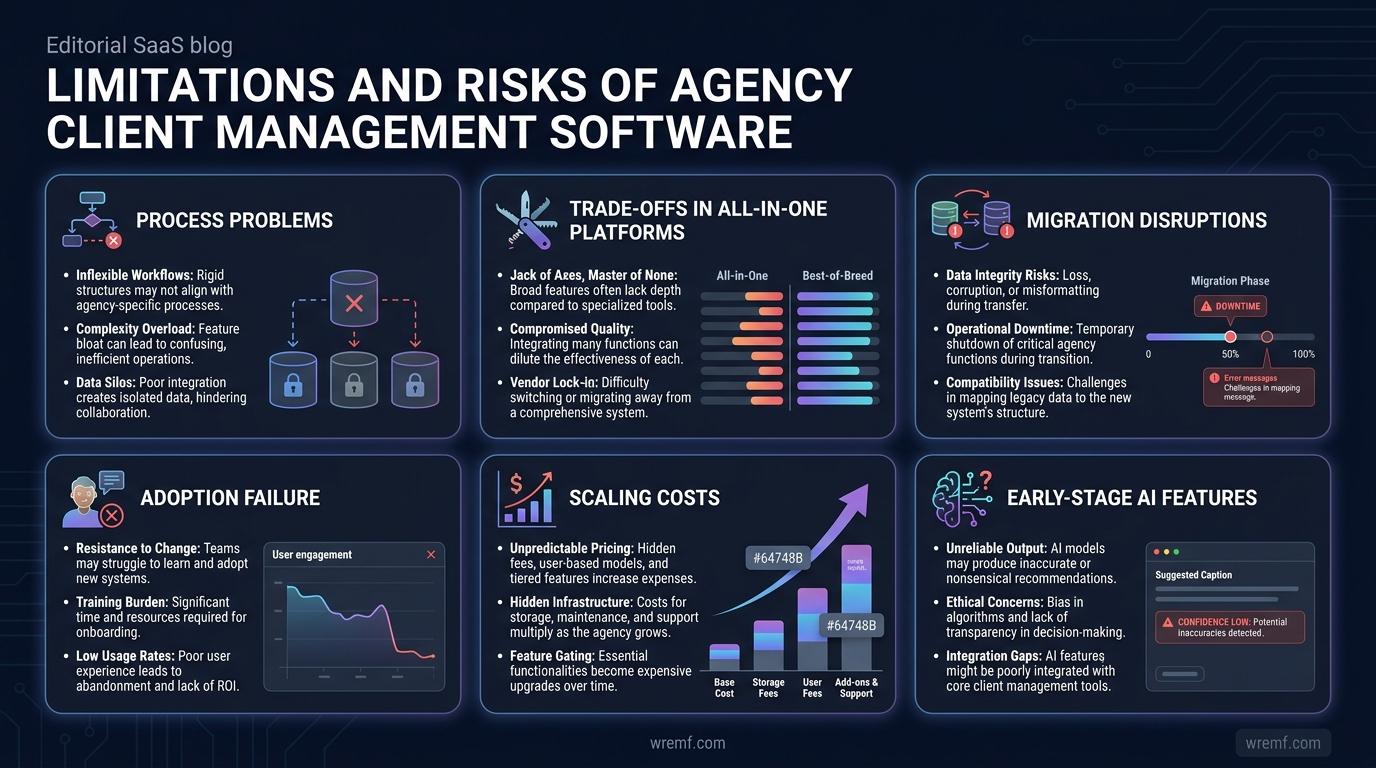
Agency client management software solves many operational problems but introduces its own set of risks and limitations that agencies should understand before committing to a platform.
Limitation one: Software does not fix process problems.
Agency management software organises existing processes. If the underlying workflows are poorly defined, the software will make bad processes visible faster but will not repair them. Agencies that adopt software without first clarifying their project delivery, billing, and communication processes often find that the tool creates new confusion rather than reducing existing friction. Process clarity must precede tool selection.
Limitation two: Adoption failure is more common than technical failure.
Most agency software implementations fail not because the software is wrong but because the team does not adopt it consistently. Time tracking that is not completed daily produces inaccurate billing data. Project statuses that are not updated regularly produce misleading dashboards. Client portals that the team does not use force clients back to email. Usage standards, training, and accountability are as important as the software itself.
Limitation three: All-in-one platforms involve trade-offs.
All-in-one agency management platforms reduce integration complexity but rarely match the depth of specialist tools in every category. A purpose-built CRM like HubSpot has a deeper sales pipeline, lead nurturing, and customer communication feature set than the CRM layer in Scoro or Accelo. A specialist reporting tool like AgencyAnalytics has more reporting and analytics software capabilities than the reporting module in most all-in-one platforms. Agencies need to decide whether depth in a specific area or breadth across all areas is the higher priority.
Limitation four: Costs scale with team size.
Most agency management platforms charge per user per month. As the agency grows, software costs increase proportionally. Agencies should model the cost at their projected team size in twelve and twenty-four months, not just their current size. A platform that costs a reasonable amount at ten users may become a significant line item at thirty users. Budget visibility requires looking forward, not just at the current invoice.
Limitation five: Migration between platforms is disruptive.
Switching agency management software after the team has been using a platform for six months or more is operationally disruptive. Historical project data, time tracking records, and client communication histories may not migrate cleanly. This is why choosing the right platform before committing to full rollout matters significantly. A two-to-four week pilot with a real client is the most practical way to validate fit before migration.
Limitation six: AI features are early stage.
Many agency management platforms are adding artificial intelligence features including resource forecasting, automated project summaries, and intelligent task assignment. These features are promising but are still early in development on most platforms in 2026. Agencies should evaluate AI features based on current functionality rather than roadmap promises. The McKinsey AI insights report notes that AI adoption in professional services is accelerating but that implementation maturity varies significantly by tool category and use case.
KEY TAKEAWAY: Agency client management software creates real operational value when the agency has clear processes, strong adoption standards, and realistic expectations about the trade-offs between depth and breadth in any single platform.
Common Misconceptions About Agency Client Management Software
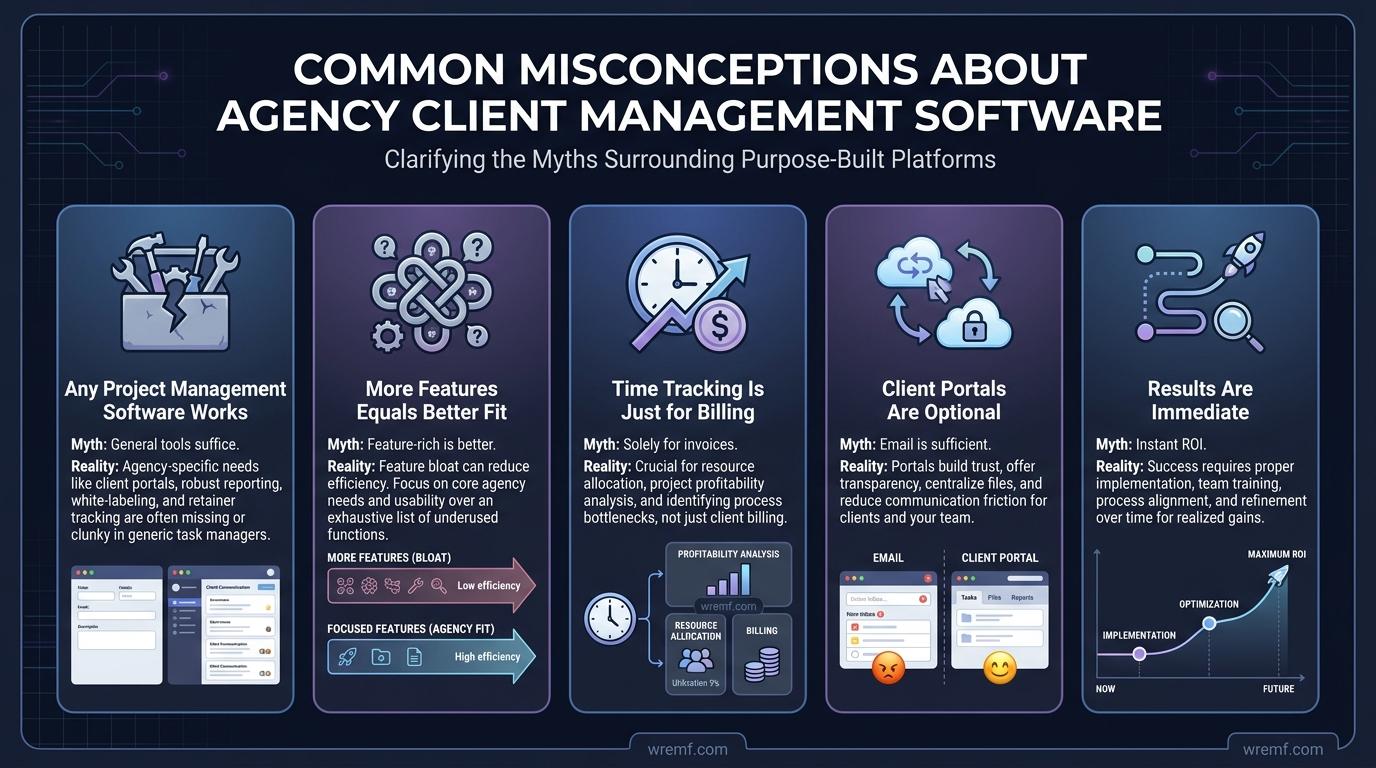
MYTH: Any project management software can serve as agency client management software.
FACT: Generic project management tools like Trello or basic task management software handle task organisation but lack the financial management, retainer billing, profitability reporting, and client portal features that agencies need. Purpose-built agency management software connects delivery, finance, and client communication in one system, which is the core operational requirement that generic tools do not meet.
MYTH: If a platform has more features, it is better for the agency.
FACT: Feature volume does not equal operational fit. An agency with ten people and twenty retainer clients needs different features than an enterprise agency managing multi-country campaigns. Choosing software based on feature count rather than operational gap analysis leads to over-engineered implementations that the team does not adopt. The right software closes the agency's specific gaps without overwhelming the team with unused functionality.
MYTH: Time tracking software is only useful for billing purposes.
FACT: Time tracking generates the data that drives resource planning, capacity management, profitability reporting, and project forecasting. Agencies that treat time tracking as only a billing tool miss the operational intelligence it produces. When time tracking is connected to resource allocation and project budgets, it becomes one of the most powerful inputs to agency decision-making.
MYTH: Client portals are a nice-to-have feature for larger agencies only.
FACT: Client portals benefit agencies of any size by reducing email volume, centralising feedback, and creating a professional client experience. Small agencies that use client portals report fewer revision cycles, faster approvals, and stronger client retention because the client always has a clear view of project status and deliverables. The investment in a client portal pays back in account manager time saved almost immediately.
MYTH: Implementing new agency management software will deliver results immediately.
FACT: Most agencies require four to eight weeks to see measurable operational improvement after adopting new agency client management software. The first two weeks involve setup, data migration, and training. Weeks three and four involve consistent team usage and process adjustment. Measurable improvements in billable time recovery, invoice accuracy, and project delivery visibility typically become visible after the first full billing cycle. Agencies should plan for a transition period and measure results at the thirty, sixty, and ninety day marks.
KEY TAKEAWAY: The most damaging misconceptions about agency client management software are that generic tools are sufficient, that more features mean better fit, and that results appear immediately. Realistic expectations, clear process definitions, and a structured pilot approach produce the best outcomes.
Conclusion
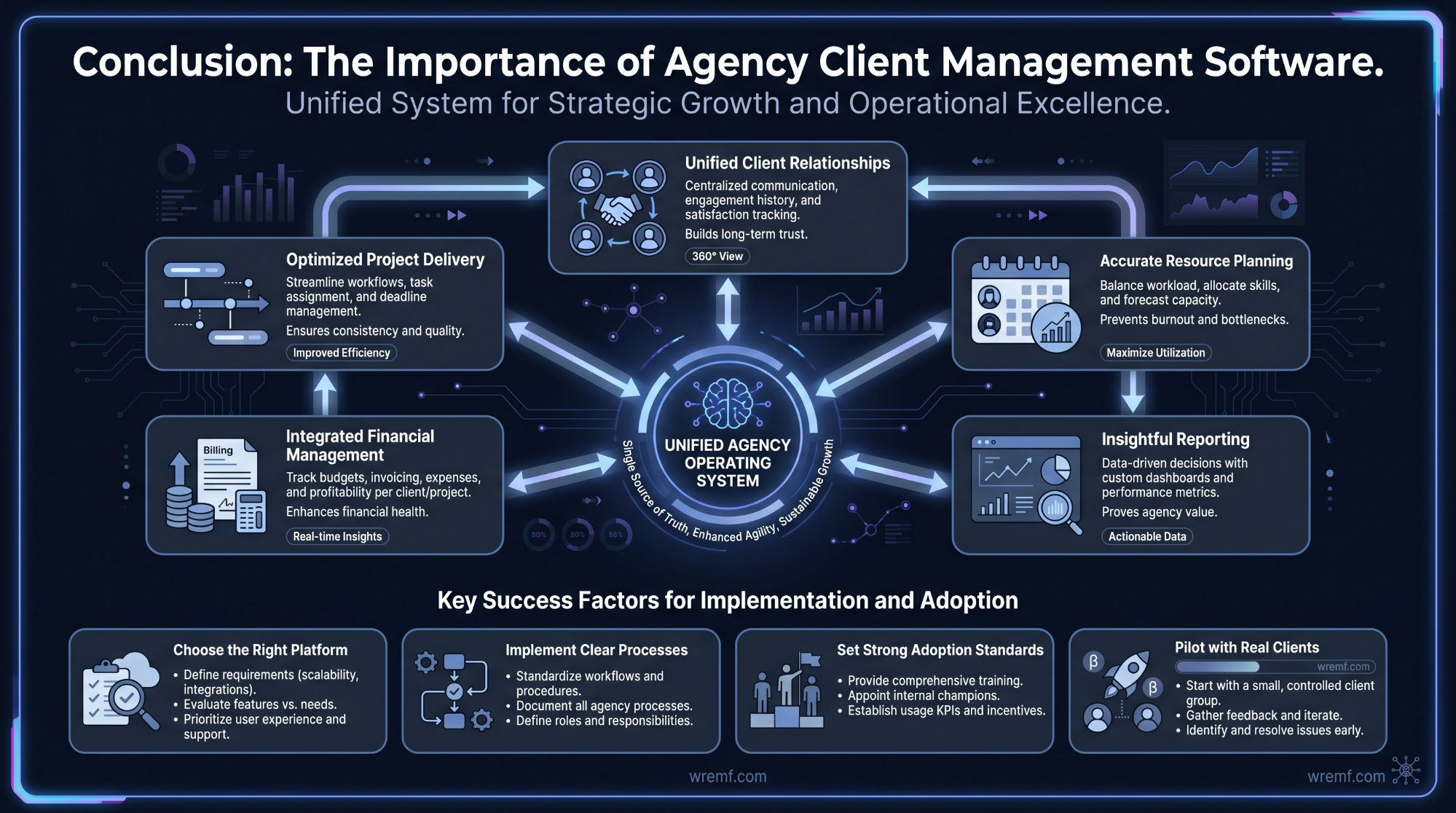
Agency client management software is the operational foundation that connects client relationships, project delivery, resource planning, financial management, and reporting into one system. Agencies that choose the right platform and implement it with clear processes, strong adoption standards, and realistic expectations consistently outperform those managing client work through disconnected tools and manual processes. The right choice depends on your agency's size, billing model, service type, and the specific operational gap you need to close first. Pilot with a real client, validate the financial management layer, and scale adoption deliberately. For agencies also building their AI search visibility and wanting to understand how AI engines recommend their services, WREMF provides a complementary layer of tracking and optimisation. Explore WREMF agency services to see how AI visibility fits alongside your agency management operations.
Frequently Asked Questions About Agency Client Management Software
What is agency client management software?
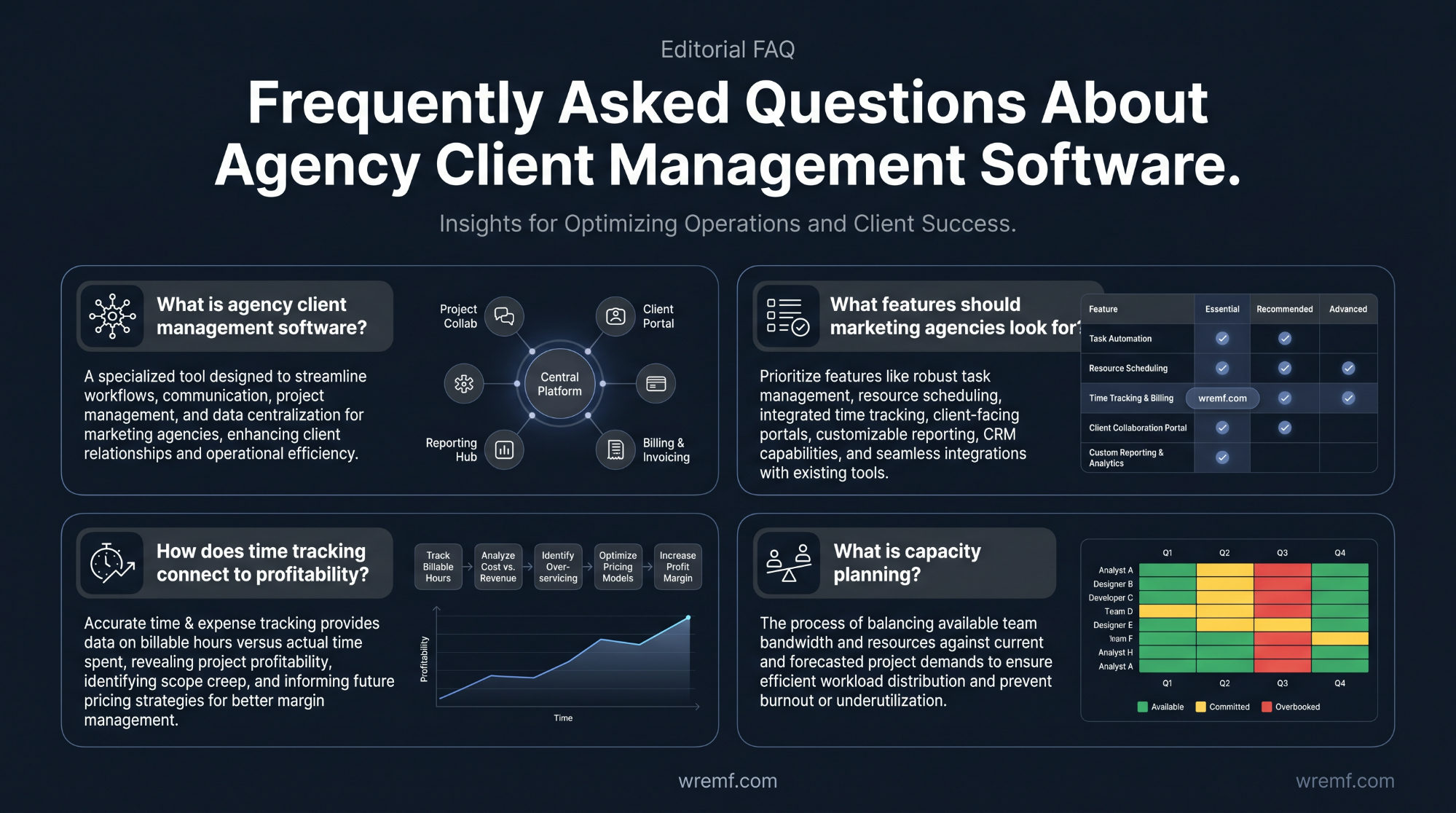
Agency client management software is a platform that helps agencies organise client work, track projects, manage resources, and handle billing in one centralised system. It typically combines project management, time tracking, client communication, invoicing, and reporting tools so teams can coordinate work across multiple clients without switching between separate applications. The core purpose is to reduce manual overhead, improve visibility into workloads and deadlines, and make it easier to deliver client-facing service delivery consistently and profitably.
What is the difference between project management software and agency management software?
Project management software handles task organisation, timelines, and team coordination. Agency management software extends this by adding client-specific workflows such as retainer management, billable time tracking, invoicing, capacity planning, financial reporting, and client portals. A tool like Trello or ClickUp can manage tasks, but purpose-built agency management systems also track profitability per client, manage resource allocation across accounts, and generate client reporting. Agencies typically outgrow standard project management tools once they need to connect operational data to financial outcomes.
What features should marketing agencies look for in management software?
The most important features for marketing agencies include workflow management, time tracking, resource and capacity planning, client communication tools, project tracking, invoicing, financial reporting, and client portals. Creative agencies also benefit from file sharing, creative collaboration tools, feedback systems, and integration with tools like Adobe Creative Cloud, Google Drive, Slack, and Zapier. Automated workflows reduce manual admin, while analytics dashboards help managers monitor budgets, deadlines, and team performance across all active client projects.
What types of software do agencies use to manage their work?
Agencies typically use a combination of project management tools, CRM platforms, time tracking software, invoicing tools, and reporting and analytics software. Popular options include Scoro, Wrike, Kantata, Workamajig, ClickUp, Accelo, ManyRequests, and SuiteDash. Some agencies also use Kanban-style boards, Gantt charts, and task management software alongside financial tools like FreshBooks or QuickBooks Online. The challenge is that using too many disconnected tools creates data silos, which is why many agencies consolidate onto a single agency management system.
What are the benefits of using one agency management platform instead of multiple tools?
Consolidating onto a single agency client management software eliminates the friction of switching between tools and reduces the risk of data inconsistency across projects, timelines, budgets, and client communication records. Teams gain a shared view of task management, resource planning, billable time, client feedback, and financial oversight in one dashboard. This improves productivity, reduces reporting errors, and makes it easier to track profitability per client or project. A unified system also simplifies onboarding new staff and scales more predictably as the agency grows.
How does agency management software improve operational efficiency?
Agency management software improves operational efficiency by centralising task visibility, resource data, client communication, time tracking, and financial management into one platform. This reduces the time spent chasing updates, manually compiling reports, or reconciling hours against invoices. Automated workflows handle recurring admin tasks such as status updates, invoice generation, and deadline reminders. Managers can monitor capacity planning in real time, identify bottlenecks before they affect deadlines, and make resource allocation decisions based on live data rather than guesswork.
How much does agency management software typically cost?
Agency management software pricing varies significantly depending on features, team size, and the number of clients managed. Entry-level tools start at roughly $10 to $30 per user per month for basic project and task management. Mid-tier platforms with time tracking, invoicing, and reporting features typically range from $30 to $80 per user per month. Enterprise-level platforms with financial forecasting, advanced analytics, API tools, and multi-channel integrations can cost significantly more. Most platforms offer tiered plans, and some charge by active project or client rather than by user seat.
What is the best agency management system for creative agencies?
There is no single best agency management system for all creative agencies, as the right choice depends on team size, workflow complexity, and the balance between creative collaboration and financial management. Wrike, Workamajig, and Kantata are frequently cited for larger creative teams needing resource management and detailed reporting. Scoro and Accelo are popular for agencies that need tight integration between project tracking, time tracking, and invoicing. Smaller agencies often start with ClickUp or ManyRequests before migrating to more specialised platforms as client volume grows.
What is the minimum set of features required for a platform to qualify as agency management software?
At minimum, an agency management system should include project and task management, time tracking, client communication tools, and some form of financial management such as invoicing or budget tracking. Without time tracking and financial management, a tool is essentially a project management tool rather than an agency management platform. Useful additions include capacity planning, client portals, workflow automation, resource management, and reporting dashboards. Platforms that cover all of these in one system are generally considered full agency management solutions rather than standalone task management software.
How long should rolling out agency management software typically take?
Rollout timelines depend on team size, data migration complexity, and whether existing workflows need to be restructured. Small agencies can typically onboard a new platform in two to four weeks. Mid-sized agencies managing multiple clients, retainers, and complex resource planning may need six to twelve weeks for full implementation. The main variables are migrating active project data, configuring automated workflows, setting up client portals, training staff, and integrating third-party tools such as Slack, Google Drive, QuickBooks Online, or Zapier. A phased rollout starting with project tracking and time tracking before adding invoicing and reporting often reduces disruption.
How do you get team buy-in when switching agency management software?
Team buy-in improves when staff understand why the change is happening and how it reduces their specific pain points rather than creating extra work. Involve team members from project management, account management, and finance early in the evaluation process. Run a pilot with a small group before full rollout. Make clear how the new system handles time tracking, task management, and client communication in a way that is simpler than the existing workflow. Providing clear training, a realistic transition timeline, and a named internal owner for the rollout significantly reduces resistance.
Can agencies mix multiple tools rather than using one platform?
Agencies can mix tools, and many do, particularly when combining a strong project management tool with a separate invoicing platform or CRM. However, mixing tools increases integration complexity, data duplication risk, and reporting overhead. The more disconnected the tools, the harder it becomes to get a single view of client profitability, resource utilisation, and project performance. Agencies that use API tools or middleware like Zapier can connect systems to reduce manual data transfer, but this adds maintenance overhead. A consolidated platform typically delivers better operational efficiency at scale than a loosely integrated stack.
What is retainer management, and why does it matter for agencies?
Retainer management refers to the process of tracking recurring client work agreements, monitoring hours consumed against agreed retainer budgets, and ensuring billing aligns with contracted scope. Agencies that manage retainers without dedicated software often struggle to track how much time has been used, whether budgets are being over-delivered, and when renewal conversations are due. Agency management software with retainer management functionality connects time tracking, project milestones, and invoicing into one workflow, helping agencies protect margins and maintain clear client communication about scope and spend throughout the engagement.
How does time tracking connect to profitability in agency software?
Time tracking is the foundation of agency profitability measurement. When team members log hours against specific client projects, the agency can calculate actual labor costs against billable amounts, identify projects running over budget, and assess which clients or service lines are most profitable. Without accurate time tracking data, financial reporting becomes an estimate rather than a measurement. Agency management software typically combines labor cost rates, time estimates, and actual logged hours to produce real-time profitability views per project, client, or service category, which helps managers make informed decisions about pricing, resource allocation, and scope management.
What is capacity planning, and how does agency software support it?
Capacity planning is the process of understanding how much work your team can realistically take on given current and upcoming commitments. Agency management software supports capacity planning by aggregating time tracking data, project timelines, resource allocation records, and employee availability into visual dashboards. This allows project managers and agency principals to see who is over-allocated, identify gaps where new work can be assigned, and avoid deadlines colliding across multiple client accounts. Without real-time capacity data, agencies commonly experience burnout, missed deadlines, and reactive hiring decisions.
What client portal features should agencies look for in management software?
Client portals in agency management software should allow clients to review project status, approve deliverables, submit feedback, access shared files, and view invoices without needing access to internal team workflows. Key features include branded or white-label presentation, file sharing, feedback systems, approval workflows, and visibility into project milestones and budgets. A well-designed client portal reduces email volume, speeds up approval cycles, and creates a professional client experience. Platforms such as SuiteDash, ManyRequests, and Wrike offer client portal functionality within their broader agency management systems.
How does workflow automation reduce manual work in agencies?
Workflow automation in agency client management software triggers predefined actions based on conditions such as a project stage changing, a deadline approaching, or a client approval being received. This can include automatically assigning tasks, sending status updates, generating invoices, notifying team members via Slack, or moving projects to the next workflow stage. Automated workflows reduce the amount of manual coordination required from project managers, lower the risk of steps being missed, and free up time for higher-value work. Most platforms allow teams to build automated workflows visually without requiring technical knowledge.
How do agencies track AI search visibility alongside traditional agency operations?
AI search visibility is an emerging performance layer that sits alongside traditional agency operations. As AI engines such as ChatGPT, Gemini, Claude, and Perplexity increasingly surface brand and service recommendations directly in AI-generated answers, agencies need to track whether their clients are being cited, mentioned, or recommended across these platforms. This requires dedicated AI visibility tracking tools separate from standard agency project management software. WREMF's AI visibility platform helps agencies monitor client brand mentions, citations, and share of voice across ten AI engines, which can be incorporated into broader client reporting workflows.
What reporting capabilities should agency management software include?
Agency management software should include project-level reporting, time and expense reporting, financial reporting covering budgets, invoices, and profitability, resource utilisation reports, and client-facing report generation. Advanced platforms also include analytics dashboards, financial forecasting, and multi-project views that allow managers to compare performance across all active accounts. The ability to export reports in formats suitable for client presentation or internal stakeholder reviews is important for agencies that need to demonstrate value regularly. According to Gartner's research on collaborative work management platforms, the trend is toward platforms that combine operational data with business outcome reporting rather than activity metrics alone.
What is the difference between CRM platforms and agency management software?
CRM platforms are primarily designed to manage sales pipelines, lead nurturing, and customer communication before a client is won. Agency management software takes over after the sale, managing project delivery, resource planning, time tracking, invoicing, and client collaboration. Some agencies use both, with a CRM handling lead generation and proposals while the agency management system handles delivery. Platforms like Accelo and SuiteDash attempt to bridge both categories by combining sales pipeline management, retainer tracking, and project delivery in one system, reducing the number of handoffs between tools.
How do agencies use AI visibility software differently from standard clients?
Agencies using AI visibility tools typically need to manage multiple client brands simultaneously, produce white-label reporting, compare AI share of voice across competing brands, and integrate insights into existing client reporting workflows. This requires platforms that support multi-brand tracking, client portals, and customisable reporting rather than single-brand dashboards. The WREMF agency plan is designed specifically for this use case, offering white-label reports, multi-website tracking, competitive landscape analysis, and the option to add managed AI visibility execution for clients that need strategy and content optimisation alongside software tracking.
When should an agency consider a managed AI visibility service rather than software alone?
A managed AI visibility service is worth considering when the agency or its clients lack the internal expertise, content resources, or time to act on AI visibility data. Software platforms provide tracking and reporting, but improving AI citations, optimising content for answer engines, building entity authority, and executing GEO strategy all require specialist knowledge and consistent execution. WREMF's managed service combines AI visibility tracking with senior-led strategy, content optimisation, citation building, and monthly reporting, which is useful for agencies that want to offer AI visibility as a client service without building a dedicated internal team. According to McKinsey's AI insights, the gap between organisations that can act on AI data and those that cannot is widening, making execution capability increasingly important.
What is AI share of voice, and should agencies be tracking it for clients?
AI share of voice measures how frequently a brand is mentioned, cited, or recommended in AI-generated answers relative to competitors across platforms like ChatGPT, Gemini, Claude, and Perplexity. As more buyers use AI search engines to research products and services, a brand's share of voice in AI answers is becoming a meaningful indicator of discovery and recommendation visibility. Agencies that track AI share of voice for clients can identify whether a client is gaining or losing ground in AI-generated responses over time, which competitive content gaps exist, and which prompts are driving recommendations. This is a growing area of client reporting that complements traditional SEO and organic performance metrics.
How do agencies report AI visibility results to clients alongside standard performance metrics?
Agencies can integrate AI visibility reporting into standard client reporting by adding metrics such as AI citation frequency, share of voice across AI engines, prompt-level visibility, and source consistency scores alongside traditional metrics like organic traffic, keyword rankings, and conversion data. Platforms like WREMF generate white-label AI visibility reports that can be delivered directly to clients or embedded into existing reporting workflows. As VentureBeat's AI coverage has noted, the shift toward AI-mediated discovery means clients increasingly need visibility data across both traditional search and AI-generated results to understand their full competitive position.
What should agencies do first when a client has low AI visibility?
The first step is an AI visibility audit that maps which prompts are relevant to the client's category, which competitors are being cited in AI-generated answers, what sources the AI engines are drawing from, and where the client's content, entity authority, or citation footprint is weak. From there, a targeted strategy can address content gaps, improve answer-ready content structure, strengthen off-site mentions and citations, and optimise for the specific AI engines where the client's audience is most active. WREMF's GEO audit feature supports this process by identifying citation gaps and content opportunities across multiple AI discovery platforms, giving agencies a structured starting point for client AI visibility improvement.
Related reading
- How to Choose the Best Search Engine Marketing Agency: The Complete B2B Buyer's Guide
- How to Choose a Fintech Content Agency: The Complete Guide for Financial Services Brands
- The Complete Guide to White Label Marketing Software for Agencies and B2B Teams
- The Complete Guide to Choosing a Search Engine Marketing Agency for B2B Growth